





Businesses today rely heavily on software to manage operations, customer relationships, communication, data and everyday workflows. However, choosing the right software deployment model can be challenging. Two common options are cloud-based software and on-premise software.
Cloud-based software runs on infrastructure managed by a cloud provider and is generally accessed through the internet. On-premise software, on the other hand, is installed and operated on a company’s own servers and infrastructure.
Both approaches have advantages and limitations. The right choice depends on factors such as budget, security requirements, scalability, IT resources, accessibility and long-term business goals.
What Is Cloud-Based Software?
Cloud-based software is hosted on remote servers managed by a cloud service provider. Businesses access the application through an internet connection rather than maintaining the entire infrastructure themselves.
Cloud solutions can make it easier for employees to access business applications from different locations and devices. Software updates, infrastructure maintenance and certain security responsibilities are generally handled by the cloud provider.
Examples include cloud-based CRM platforms, accounting software, project management systems and business applications.
What Is On-Premise Software?
On-premise software is installed and operated on servers owned or controlled by the organization. The company is responsible for managing the infrastructure, software installation, updates, backups, maintenance and much of the security environment.
This model can provide businesses with greater control over their IT infrastructure and data environment, particularly when organizations have specific internal requirements.
However, it may require higher investment in hardware, IT personnel and ongoing infrastructure management.
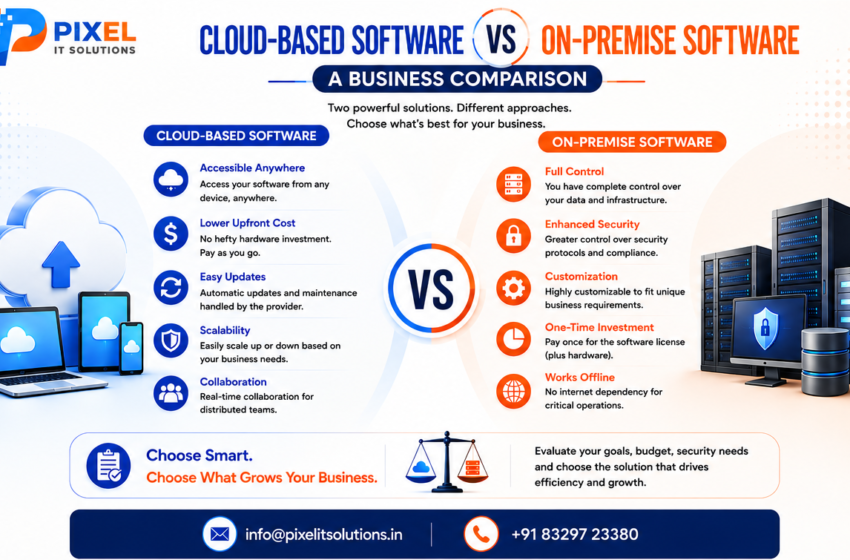
Cloud-Based vs On-Premise Software: Key Differences
Factor Cloud-Based Software On-Premise Software
Infrastructure Hosted by cloud provider Managed by business
Initial investment Usually lower Usually higher
Accessibility Accessible remotely Often dependent on internal network setup
Scalability Generally easier to scale May require additional hardware
Maintenance Mostly provider-managed Business-managed
Updates Often automatically managed Usually managed internally
IT resources Lower infrastructure burden Greater IT responsibility
Customization Depends on provider/platform Often offers greater infrastructure control
Internet dependency Usually required Can support local access
Control Shared with provider Greater direct control
Advantages of Cloud-Based Software
Lower Infrastructure Requirements
Businesses do not necessarily need to purchase and maintain extensive server infrastructure. This can reduce the burden associated with hardware management.
Easier Scalability
As a company grows, cloud resources can generally be adjusted to support changing workloads, users and storage requirements.
Remote Accessibility
Employees can access cloud applications from different locations, making them useful for distributed teams and businesses with flexible work arrangements.
Simplified Maintenance
Cloud providers typically manage infrastructure maintenance and many software updates, reducing the amount of technical administration required from the business.
Faster Deployment
Cloud applications can often be deployed faster because organizations do not need to build the entire underlying infrastructure themselves.
Advantages of On-Premise Software
Greater Infrastructure Control
Businesses maintain direct control over their servers, network environment and software deployment.
Greater Customization Potential
Organizations with specialized operational or compliance requirements may prefer the control offered by an on-premise environment.
Internal Data Management
Some businesses prefer keeping applications and data within their own infrastructure because of internal policies or specific data-management requirements.
Reduced Dependence on External Providers
An on-premise environment gives organizations greater independence from third-party hosting providers, although the business assumes more responsibility for maintaining the infrastructure.
Cloud-Based Software: Potential Challenges
Cloud computing isn’t automatically the best solution for every organization.
Businesses should consider:
Dependence on reliable internet connectivity
Recurring subscription or hosting costs
Vendor dependency
Data migration requirements
Provider-specific security policies
Integration limitations
Companies should carefully review the provider’s security, backup, availability and data-management practices before selecting a solution.
On-Premise Software: Potential Challenges
On-premise software can provide greater control, but that control comes with additional responsibilities.
Businesses may need to manage:
Server hardware
Software updates
Backup systems
Network infrastructure
Security controls
IT personnel
Hardware replacement
Disaster recovery
These requirements can increase both operational complexity and long-term maintenance costs.
Which Option Is More Cost-Effective?
Cost should not be evaluated only by looking at the initial purchase price.
For cloud-based software, businesses should consider subscription fees, storage, users, integrations and additional services.
For on-premise software, the total cost may include hardware, licenses, installation, IT staff, maintenance, upgrades, electricity, backup systems and security infrastructure.
Therefore, businesses should compare the total cost of ownership (TCO) over several years rather than focusing only on the initial investment.
Which Is More Secure?
Security depends largely on how the solution is designed, configured and managed.
A cloud provider may offer professional infrastructure security, monitoring, backups and access controls. However, businesses still need to manage user permissions, passwords, application configurations and data access appropriately.
With on-premise software, organizations have greater direct control but also greater responsibility for protecting their infrastructure.
The right question isn’t simply “Which is more secure?”
Instead, businesses should ask:
“Which deployment model allows us to meet our security requirements effectively with the resources we have?”
Cloud vs On-Premise: Which Should Your Business Choose?
Cloud-based software may be suitable for businesses that prioritize:
Flexible access
Scalability
Faster deployment
Lower infrastructure management
Distributed teams
Reduced hardware requirements
On-premise software may be more suitable for organizations that prioritize:
Direct infrastructure control
Specialized customization
Internal data-management requirements
Existing IT infrastructure
Specific operational or compliance needs
There is also no requirement for businesses to follow a single approach for every application. Some organizations use a hybrid model, combining cloud and on-premise systems according to their specific needs.
How to Make the Right Decision
Before selecting a deployment model, businesses should evaluate:
- Business Size and Growth
Consider how many users you have today and how your requirements may change in the future. - Budget
Compare both initial and long-term costs. - Security Requirements
Identify your data protection, access-control and compliance requirements. - IT Capabilities
Assess whether your team can manage servers, backups, updates and infrastructure security. - Accessibility Requirements
Consider whether employees need access from multiple locations or devices. - Integration Needs
Check whether the software can integrate with your existing business systems. - Customization
Determine how much control you need over the application’s environment and functionality.
Final Thoughts
Cloud-based and on-premise software can both provide effective solutions for businesses. The better choice depends on your organization’s technical requirements, budget, security needs, scalability plans and internal resources.
Cloud solutions can provide flexibility, scalability and reduced infrastructure management, while on-premise solutions can offer greater control and customization.
Instead of choosing based purely on trends, businesses should evaluate their current requirements and long-term goals before investing in a software solution.
For organizations looking for custom software development, web applications or technology solutions, working with an experienced development partner can make it easier to evaluate the available options and select an architecture that supports future growth.
Not sure whether cloud-based, on-premise or hybrid software is right for your business?
Pixel IT Solutions can help you evaluate your requirements and develop technology solutions aligned with your business goals. From custom software and web applications to scalable digital solutions, our team can help you choose the right technology approach.
Talk to Pixel IT Solutions today and build a software solution designed for your business.
Company Name: Pixel IT Solutions
Website: https://pixelitsolutions.in/
📞: +91 832-972-3380
Frequently Asked Questions
- What is the main difference between cloud-based and on-premise software?
Cloud-based software is hosted on remote infrastructure and accessed through the internet, while on-premise software is installed and managed on servers controlled by the organization. - Is cloud-based software cheaper than on-premise software?
Cloud software can require less upfront infrastructure investment, but ongoing subscription and service costs should be considered. On-premise software may have higher initial costs but different long-term ownership economics. - Is on-premise software more secure than cloud software?
Not necessarily. Security depends on the technology, configuration, monitoring and management practices. Both deployment models can be secure when implemented properly. - Which option is better for a growing business?
Cloud-based software can be attractive for growing businesses because resources and access can often be scaled more easily. However, the best option depends on the company’s specific requirements. - Does cloud software require an internet connection?
Most cloud applications require internet connectivity for normal access. Some applications may provide offline functionality, depending on how they are designed. - Can on-premise software be accessed remotely?
Yes. Remote access can be implemented through appropriate network configurations, VPNs or other secure remote-access solutions. - What is hybrid software deployment?
Hybrid deployment combines cloud-based and on-premise infrastructure, allowing businesses to use each model where it provides the greatest benefit. - How should a business choose between cloud and on-premise software?
Businesses should compare factors such as cost, security, scalability, accessibility, customization, IT resources, integration requirements and long-term business objectives.