



A website can look modern and professional, but good visual design alone does not guarantee business results. If visitors cannot quickly understand what you offer, find important information, or figure out what to do next, even a beautiful website can lose potential customers.
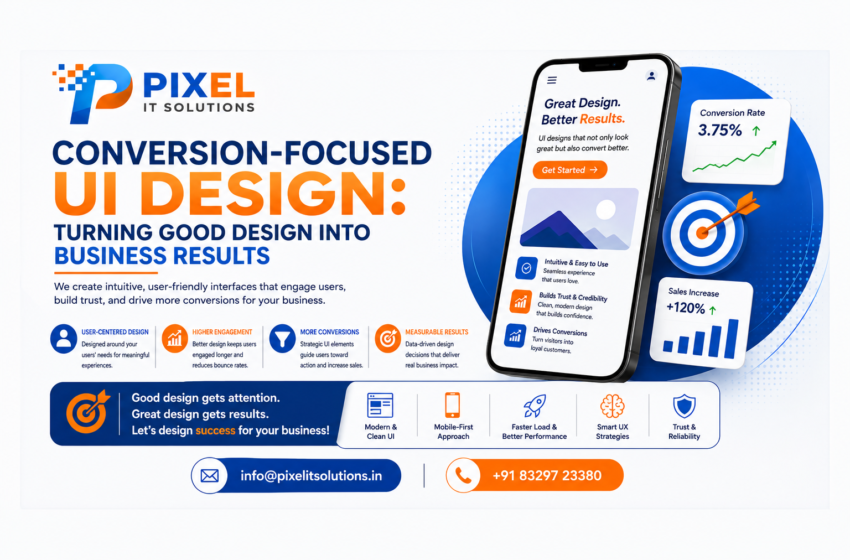
This is where conversion-focused UI design becomes important. It combines visual design, usability, user psychology, content hierarchy, navigation, and calls-to-action to create interfaces that encourage visitors to take meaningful actions.
For businesses, the objective is simple: design an experience that looks good, works smoothly, builds trust, and supports conversions.
What Is Conversion-Focused UI Design?
Conversion-focused UI design is the process of creating a digital interface with specific business objectives in mind.
Instead of designing a website only around aesthetics, designers consider actions such as:
Making an enquiry
Requesting a quote
Purchasing a product
Booking a service
Signing up for an account
Downloading a resource
Submitting a contact form
Calling the business
Every visual element has a purpose. Layout, typography, buttons, colours, images, forms, spacing, and navigation are structured to make the user’s journey easier and more intuitive.
Why Good-Looking Websites Don’t Always Convert
A visually impressive website can still have a poor conversion rate.
Common reasons include:
Unclear messaging: Visitors don’t immediately understand what the business offers.
Too many choices: Excessive menus, buttons, and links can make decision-making difficult.
Weak calls-to-action: Generic buttons such as “Submit” may not communicate what happens next.
Poor navigation: Users struggle to find products, services, pricing, or contact information.
Long forms: Asking for unnecessary information can discourage users from completing an enquiry.
Poor mobile experience: A website that works well on desktop but is difficult to use on smartphones can lose potential customers.
Good UI design addresses these problems by making the interface clearer and easier to use.
Key Elements of Conversion-Focused UI Design
- Clear Visual Hierarchy
Users don’t read every word on a webpage. They scan the content and look for information that appears important.
A strong visual hierarchy helps visitors identify:
The main message
Important benefits
Supporting information
Key features
Calls-to-action
Trust signals
Headings, typography, spacing, images, and positioning can guide the visitor’s attention toward the most important elements. - Strong and Relevant CTAs
A call-to-action tells visitors what they can do next.
Instead of using vague buttons such as “Click Here,” businesses can use action-oriented CTAs such as:
Get a Free Consultation
Request a Quote
Book a Demo
Start Your Project
Talk to an Expert
The CTA should match the user’s stage in the buying journey and clearly communicate the next step. - Simple Navigation
Visitors should be able to move around a website without confusion.
A well-designed navigation system should make important pages easy to find while avoiding unnecessary complexity.
For business websites, key sections such as Services, About, Products, Case Studies, Blog, and Contact should be presented logically. - Mobile-Friendly Design
A significant portion of website traffic comes from mobile devices. Therefore, responsive UI design is essential.
A mobile-friendly interface should provide:
Readable text
Properly sized buttons
Easy scrolling
Simple navigation
Fast-loading pages
Convenient forms
Properly scaled images
The goal is to provide a consistent experience regardless of screen size. - Effective Landing Page Design
Landing pages are often created for specific campaigns, products, or services.
A conversion-focused landing page should generally include:
A clear headline
A compelling value proposition
Relevant visuals
Key benefits
Social proof
Trust indicators
A strong CTA
A simple enquiry or signup process
Removing unnecessary distractions can help users focus on the intended action.
How UI Design Influences User Psychology
Good UI design doesn’t manipulate users. Instead, it reduces confusion and makes decision-making easier.
For example, consistent design patterns help users understand how an interface works. Familiar button styles, predictable navigation, clear labels, and logical layouts reduce the mental effort required to interact with a website.
Trust also plays an important role.
Testimonials, reviews, client logos, certifications, case studies, secure payment indicators, and transparent information can help reduce uncertainty when users are considering a purchase or enquiry.
The Role of White Space
White space is not wasted space.
Proper spacing between headings, paragraphs, images, buttons, and sections makes a page easier to scan. A cluttered interface can overwhelm users, while a balanced layout helps important information stand out.
Strategic white space can therefore improve both readability and usability.
Forms Should Be Easy to Complete
Contact and enquiry forms are important conversion points.
A form that asks for too much information can discourage visitors from completing it.
Businesses should consider whether every field is necessary.
For example, an initial enquiry may only require:
Name
Email or phone number
Requirement
Additional information can often be collected later in the customer journey.
Speed and Performance Matter
UI design and website performance are closely connected.
Large images, unnecessary animations, excessive scripts, and poorly optimized components can slow down a website.
A slow interface can create frustration and increase the likelihood that visitors leave before completing an action.
Conversion-focused design should therefore consider both appearance and performance.
Use A/B Testing to Improve Results
Design decisions shouldn’t always rely on assumptions.
A/B testing allows businesses to compare different versions of an element and measure which performs better.
You can test:
CTA wording
Button placement
Headlines
Images
Form length
Page layouts
Pricing presentation
Navigation elements
For example, a business might test two different CTA messages to determine which generates more enquiries.
Track the Right Metrics
To understand whether UI improvements are working, businesses should monitor relevant metrics such as:
Conversion rate
Form submissions
Click-through rate
CTA clicks
Bounce rate
Engagement
Session duration
Cart abandonment
Lead generation
Sales
The most important metric depends on the business objective.
A website designed to generate leads should focus heavily on enquiries and qualified leads rather than simply measuring page views.
UI Design vs UX Design
UI and UX are closely connected but aren’t exactly the same.
UI (User Interface) focuses on how the digital product looks and how users interact with its visual elements.
UX (User Experience) focuses on the overall experience and how easily users can accomplish their goals.
For example, an attractive button is a UI element. Deciding where that button should appear and what action it should support is part of the broader UX and conversion strategy.
The strongest digital products combine both.
Common UI Design Mistakes That Can Hurt Conversions
Businesses should avoid:
Cluttered layouts
Too many CTAs
Unclear messaging
Tiny or difficult-to-read text
Poor mobile responsiveness
Complicated navigation
Distracting pop-ups
Long forms
Low-contrast content
Inconsistent design elements
Slow-loading visual elements
Missing trust signals
Even small usability problems can affect the customer’s journey.
How Pixel IT Solutions Can Help
Creating a conversion-focused interface requires more than making a website visually appealing. It requires understanding the target audience, business objectives, customer journey, and desired actions.
Pixel IT Solutions can help businesses create user-focused digital experiences that combine modern UI design with usability, responsive layouts, intuitive navigation, and conversion-oriented elements.
Whether you are developing a new website, redesigning an existing platform, or building a digital product, a strategic UI approach can help create a better experience for users while supporting measurable business goals.
Conclusion
Conversion-focused UI design brings together design, usability, psychology, technology, and business objectives.
A successful interface should help visitors understand your offering, navigate your website easily, trust your business, and take the next step.
The goal isn’t simply to create a website that looks good. The goal is to create a digital experience that works for both the user and the business.
By improving visual hierarchy, CTAs, navigation, mobile usability, forms, performance, and testing, businesses can create interfaces that are better positioned to turn visitors into leads and customers.
Ready to Turn Your Website Into a Better Business Tool?
A beautiful website should do more than create a good first impression—it should help your visitors take action.
Pixel IT Solutions creates modern, user-friendly, and conversion-focused UI/UX experiences designed around your business goals. From website interfaces to digital products, our team can help you create experiences that are easy to use and built for results.
Contact Pixel IT Solutions today to discuss your UI/UX design requirements and create a digital experience that works for your customers and your business.
Company Name: Pixel IT Solutions
Website: https://pixelitsolutions.in/
📞: +91 832-972-3380
FAQs
- What is conversion-focused UI design?
Conversion-focused UI design is the process of designing a digital interface to encourage users to complete valuable actions such as making enquiries, purchases, registrations, or bookings. - How does UI design affect conversions?
A clear and intuitive interface makes it easier for users to understand information, navigate a website, build trust, and complete desired actions, which can improve conversion opportunities. - What makes a CTA effective?
An effective CTA should be clear, relevant, noticeable, and action-oriented. It should tell users exactly what they can expect when they click it. - Is mobile-friendly UI important for conversions?
Yes. Users increasingly access websites through smartphones. A difficult mobile experience can cause visitors to leave before completing an action. - What is the difference between UI and UX design?
UI focuses primarily on the interface’s visual elements and interactions, while UX focuses on the overall user experience and how easily users can accomplish their goals. - How can businesses improve website conversions through UI design?
Businesses can improve conversion opportunities through clearer messaging, better CTAs, simpler navigation, responsive design, shorter forms, stronger trust signals, faster performance, and continuous testing. - What should be tested in conversion-focused UI design?
Businesses can test headlines, CTA wording, button placement, forms, images, page layouts, navigation, and other elements that influence user behaviour. - Can good UI design increase sales?
Good UI design can make it easier for users to navigate the buying journey and complete desired actions. However, conversions also depend on factors such as pricing, product quality, traffic quality, messaging, and the overall customer experience.