





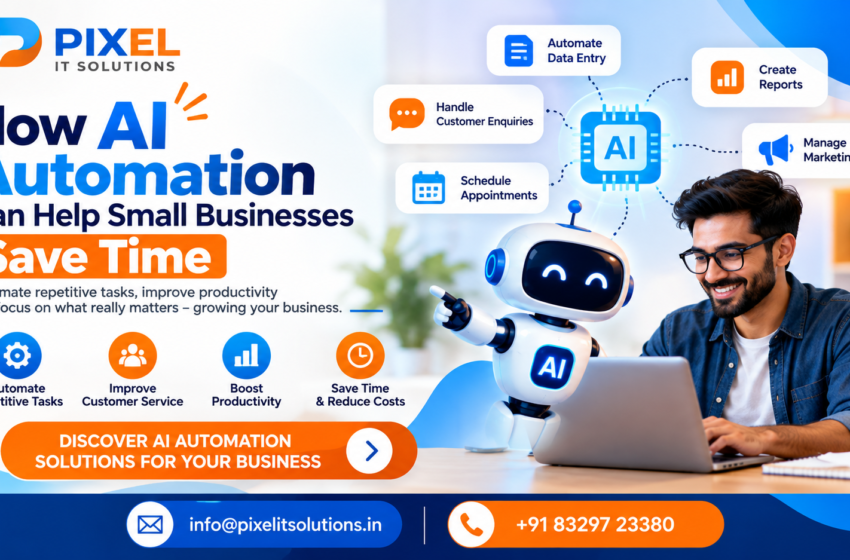
Running a small business often means managing multiple responsibilities at once. From responding to customer enquiries and scheduling appointments to maintaining records, preparing reports, and handling marketing activities, everyday tasks can consume a significant amount of time.
While these activities are essential, many are repetitive and follow predictable patterns. Spending too much time on them can leave business owners and employees with less time to focus on customer relationships, business development, and growth.
This is where AI automation can make a difference. By combining artificial intelligence with workflow automation, businesses can streamline routine processes, reduce manual effort, and improve the way work gets done.
For small businesses, AI automation is not just about adopting new technology. It is about finding practical ways to save time, use resources efficiently, and make everyday operations easier to manage.
At Pixel IT Solutions, we help businesses explore technology solutions that simplify workflows and support smarter, more efficient operations.
What Is AI Automation?
AI automation combines artificial intelligence technologies with automated workflows to perform tasks that would otherwise require manual effort.
Traditional automation follows predefined rules, such as sending an email when a form is submitted. AI-powered automation can go further by interpreting customer messages, categorising enquiries, summarising information, extracting data from documents, and helping generate relevant responses.
For example, a small business can use automation to capture a customer enquiry from its website, categorise the request, send an acknowledgement, and notify the appropriate team member.
Depending on the tools involved, AI can also help identify the enquiry’s intent and suggest a suitable response for human review.
The result is a more organised workflow with fewer repetitive manual steps.
- Automate Repetitive Administrative Tasks
Administrative work is one of the biggest areas where small businesses can save time. Tasks such as copying information between spreadsheets, updating records, creating routine documents, and organising data can take up hours every week.
AI automation can help reduce this workload by connecting business applications and handling repetitive processes.
Examples include:
Extracting relevant information from invoices and documents.
Transferring form submissions into a CRM or spreadsheet.
Generating routine reports from business data.
Categorising incoming emails and support requests.
Preparing summaries of meetings or business documents.
Business benefit: Employees spend less time on routine administration and more time on work that requires judgement, problem-solving, and personal interaction. - Respond to Customer Enquiries Faster
Customers often expect quick responses when they contact a business. If enquiries remain unanswered for too long, potential customers may lose interest or contact another provider.
AI chatbots and automated communication workflows can help businesses provide timely assistance, even when the team is busy.
For example, an AI-powered chatbot on a website can answer common questions about services, business hours, delivery policies, or appointment availability. It can also collect contact details and direct more complex enquiries to the right person.
How small businesses can use it:
Answer frequently asked questions.
Acknowledge new website enquiries.
Categorise customer requests.
Route enquiries to the appropriate department.
Provide basic information outside normal business hours.
Business benefit: Faster initial responses, more organised enquiry management, and less time spent answering the same questions repeatedly.
Human support should remain available for complex, sensitive, or high-value conversations. - Simplify Appointment Scheduling and Reminders
Businesses such as consultants, clinics, agencies, salons, and service providers often spend considerable time arranging appointments and reminding customers about upcoming bookings.
Automated scheduling workflows can reduce back-and-forth communication and help keep calendars organised.
Examples include:
Sending booking confirmations automatically.
Sharing appointment reminders through approved communication channels.
Notifying staff when an appointment is booked or changed.
Collecting relevant information before a meeting.
Offering available time slots through a connected scheduling system.
AI can also help interpret scheduling requests or route them to the appropriate workflow, depending on the system’s capabilities.
Business benefit: Less time spent coordinating appointments and fewer avoidable scheduling errors. - Improve Lead Management and Follow-Ups
For many small businesses, managing leads consistently is a challenge. Enquiries may arrive through websites, email, social media, phone calls, or messaging platforms. Without a structured process, some leads can be overlooked.
AI automation can help organise this information and support a more consistent follow-up process.
For example, an automated lead workflow can:
Capture a new enquiry from a connected channel.
Store the details in a CRM.
Categorise the enquiry based on its requirements.
Assign it to the appropriate salesperson.
Send an acknowledgement and schedule a follow-up reminder.
Update the lead status as the sales process progresses.
AI can assist with summarising conversations and identifying common customer questions, while sales staff remain responsible for important decisions and relationship-building.
Business benefit: Better lead visibility, fewer missed follow-ups, and a more organised sales process. - Make Marketing Workflows More Efficient
Small businesses often have limited marketing resources. Creating content, planning social media posts, preparing email campaigns, and reviewing performance can take considerable time.
AI tools can help accelerate parts of these workflows without removing the need for human creativity and strategic direction.
Useful applications include:
Generating initial ideas for blog posts and social media content.
Repurposing long-form content into shorter formats.
Drafting email campaigns for review.
Organising content calendars.
Summarising campaign performance reports.
Identifying patterns in customer feedback and engagement data.
For example, a business could turn one detailed blog post into several social media drafts and an email newsletter outline, then have its marketing team review and refine the content.
Business benefit: A more efficient content production process and more time available for campaign strategy, creative development, and performance improvement.
AI-generated content should be checked for accuracy, originality, brand consistency, and relevance before publication. - Automate Data Entry and Document Processing
Manual data entry can be time-consuming and may introduce errors when information is copied between systems.
AI-powered document processing can extract information from invoices, purchase orders, application forms, receipts, and other business documents. Automation can then transfer the extracted information into connected business systems for further processing.
Examples include:
Extracting names, dates, and amounts from invoices.
Organising customer forms and applications.
Categorising expenses for review.
Extracting key information from purchase orders.
Flagging incomplete or inconsistent records.
For important financial or business records, extracted information should be validated before it is approved or used for further processing.
Business benefit: Less repetitive typing, faster document handling, and more consistent record management. - Generate Reports and Business Insights Faster
Preparing reports often requires collecting information from multiple sources, organising data, and identifying useful trends. This can be particularly challenging for small businesses without dedicated data analysts.
AI tools can help summarise information, explain trends, and prepare draft reports from structured business data.
For instance, an online store might use automation to compile sales figures, identify its best-performing product categories, and generate a weekly summary for the business owner.
AI automation can support:
Weekly sales summaries.
Marketing campaign reports.
Customer enquiry analysis.
Inventory and order summaries.
Expense and operational reports.
Performance dashboards.
Business benefit: Faster access to relevant information and more time to focus on decisions rather than preparing reports manually.
AI-generated insights should be checked against the underlying data, especially when they influence financial or operational decisions. - Improve Inventory and Order Management
Businesses that sell products often need to track stock levels, process orders, update customers, and coordinate deliveries. Managing these tasks manually becomes difficult as order volumes increase.
Workflow automation can connect inventory, order management, and customer communication systems. AI can add value by identifying unusual patterns or helping forecast demand when sufficient reliable historical data is available.
Practical applications include:
Sending order confirmations automatically.
Updating customers when order statuses change.
Alerting staff when inventory reaches a defined threshold.
Identifying products with changing demand patterns.
Flagging unusual orders for manual review.
Preparing stock and order summaries.
Business benefit: More organised order processing, improved visibility into inventory, and less time spent coordinating routine updates.
Inventory recommendations should account for seasonality, supplier lead times, and other business factors rather than relying on AI predictions alone. - Support Better Team Productivity
Small teams often manage several roles simultaneously. Employees may switch between emails, spreadsheets, meetings, customer requests, and project management tools throughout the day.
AI productivity tools can reduce some of this workload by helping teams organise information and complete routine tasks faster.
Examples include:
Summarising meeting notes and identifying action items.
Drafting internal emails and business documents.
Organising project updates.
Searching internal knowledge bases.
Preparing task summaries.
Categorising support tickets and assigning priorities.
These tools work best when they fit naturally into the team’s existing workflow and employees understand when AI-generated information needs to be reviewed.
Business benefit: Less time spent searching, summarising, and coordinating, leaving more time for meaningful work. - Reduce Operational Costs as Your Business Grows
As a business expands, its workload usually increases. More customers can mean more enquiries, invoices, appointments, reports, and administrative tasks.
Hiring additional staff may be necessary, but some repetitive work can be streamlined before the business expands its operational capacity.
AI automation can help businesses handle recurring tasks more consistently without requiring every step to be completed manually.
However, automation does not eliminate every cost. Software subscriptions, integration work, implementation, monitoring, and ongoing maintenance also need to be considered.
Business benefit: Better use of existing resources, more scalable workflows, and the opportunity to grow without increasing manual workload at the same rate.
Which Tasks Should Your Small Business Automate First?
Not every process needs AI. The best starting point is usually a task that happens frequently, follows a reasonably predictable pattern, consumes noticeable staff time, and has measurable outcomes.
Use this checklist to identify potential automation opportunities.
Find your first automation opportunity
Select the tasks that consume the most time in your business.
Customer enquiry acknowledgements
Frequent messages that need a quick initial response.
Appointment confirmations and reminders
Repeated scheduling and notification tasks.
Data entry and document extraction
Moving information between documents and business systems.
Lead assignment and follow-up reminders
Keeping enquiries organised and sales tasks on schedule.
Routine reports and summaries
Compiling recurring business information.
Marketing content preparation
Drafting and repurposing content for human review.
3 tasks selected
Create an automation plan
Before implementation, estimate how much time each task consumes, identify the tools already in use, and decide what a successful result would look like. Start with one workflow, test it, and expand once the benefits are clear.
How to Implement AI Automation in Your Small Business
A successful automation project begins with a business problem, not simply the desire to use AI.
Identify repetitive work
Review daily activities and find tasks that consume time without requiring constant human judgement.
Map the existing workflow
Document how information enters the business, who handles it, what decisions are made, and where delays occur.
Choose suitable tools
Select automation platforms, AI services, and integrations that work with your existing CRM, email, website, or business software.
Start with a small pilot
Automate one process first. Test common scenarios, exceptions, permissions, and error handling before wider deployment.
Measure the results
Compare time spent, error rates, response times, and operating costs before and after implementation.
Review and improve
Monitor performance, protect business data, and update the workflow as your business requirements change.
Important Considerations Before Adopting AI Automation
AI automation can offer practical benefits, but it needs thoughtful implementation.
Data privacy: Avoid sending sensitive customer or business information to tools that are not approved for that use.
Accuracy: Verify AI-generated responses, extracted data, and reports where mistakes could cause harm.
Human oversight: Keep people involved in sensitive customer interactions, financial approvals, and consequential decisions.
Integration: Check whether the tools can communicate reliably with your existing systems.
Cost: Consider subscriptions, setup, maintenance, and usage charges alongside the expected savings.
Reliability: Establish alerts, fallback procedures, and manual alternatives for failed workflows.
The objective is not to automate everything. It is to automate the right tasks safely and reliably.
How Pixel IT Solutions Can Help
Every small business has different operational challenges. A retailer may want to streamline orders, while a service provider may need better appointment management or a professional services company may want to organise customer enquiries.
Pixel IT Solutions helps businesses explore practical technology solutions that simplify routine work and improve operational efficiency.
Depending on your requirements, an AI automation solution may include:
Workflow automation between existing business applications.
AI-powered customer enquiry handling.
Automated data entry and document processing.
CRM and lead management integrations.
Automated notifications, reminders, and reporting.
AI-assisted business productivity workflows.
Custom software integrations and process improvements.
We focus on understanding your existing processes, identifying suitable opportunities, and recommending an approach that fits your business needs and budget.
The right solution should save measurable time, fit into existing operations, and provide value beyond simply introducing new technology.
Conclusion
AI automation gives small businesses an opportunity to spend less time on repetitive work and more time on activities that support growth. From customer enquiries and appointment scheduling to document processing, marketing, reporting, and team productivity, the right workflows can make everyday operations more efficient.
The key is to start with a clear objective, choose tasks that are suitable for automation, and measure the results. Businesses should also maintain appropriate human oversight, protect sensitive information, and review workflows regularly.
You do not need to automate your entire business at once. Start with one time-consuming task, improve it, and build from there.
Pixel IT Solutions can help you explore how AI automation could fit into your business and create more efficient ways of working.
Ready to Save Time with AI Automation?
Spend less time on repetitive tasks and more time growing your business. Pixel IT Solutions can help you identify automation opportunities and explore technology solutions that make your workflows more efficient.
Let’s find the right AI automation solution for your business.
info@pixelitsolutions.in
+91 83297 23380
Frequently Asked Questions (FAQs)
- What is AI automation for small businesses?
AI automation combines artificial intelligence with automated workflows to handle repetitive tasks such as customer communication, data entry, document processing, reporting, and lead management. It helps businesses reduce manual effort and improve operational efficiency. - How can AI automation help small businesses save time?
AI automation can reduce the time spent on repetitive administrative work, scheduling, customer enquiry handling, data processing, and report preparation. The amount of time saved depends on the workflow, the tools used, and the quality of implementation. - Is AI automation affordable for small businesses?
AI automation can be affordable when businesses start with a focused, high-value task. Costs vary depending on software subscriptions, integration requirements, usage, and maintenance. A pilot project can help establish whether the expected benefits justify the investment. - Which business tasks can be automated using AI?
Common opportunities include customer support, lead management, appointment reminders, invoice data extraction, email categorisation, marketing content preparation, report generation, and order updates. Tasks with predictable steps and measurable outcomes are often good starting points. - Do small businesses need technical expertise to use AI automation?
Not always. Many automation platforms offer visual, no-code interfaces that allow businesses to connect applications and create workflows. More complex projects involving custom software, APIs, or advanced AI capabilities may require technical expertise. - Can AI automation improve customer service?
Yes. AI chatbots and automated workflows can answer common questions, acknowledge enquiries, organise support requests, and route complex issues to staff. Human assistance remains important for sensitive situations and requests that require judgement. - What is the difference between AI and traditional automation?
Traditional automation generally follows predefined rules and instructions. AI can interpret information, recognise patterns, summarise content, and help process less structured inputs. Combining both allows businesses to automate workflows that involve repetitive steps and certain information-processing tasks. - Is AI automation safe for business data?
It can be implemented securely, but safety depends on the tools, configuration, access controls, data handling practices, and applicable privacy requirements. Businesses should review vendor policies, restrict access to sensitive information, and establish appropriate human oversight. - How should a business measure the success of AI automation?
Businesses can track time saved, processing speed, error rates, customer response times, employee workload, and total operating costs. Comparing these measures before and after implementation helps determine whether the automation delivers meaningful value. - How can Pixel IT Solutions help with AI automation?
Pixel IT Solutions can help businesses explore workflow automation, AI-powered processes, application integrations, and custom technology solutions. The recommended approach depends on your existing systems, business goals, budget, and operational requirements.